Comparisons · Smartwatches
Which smartwatch to buy for your phone (and when a fitness band is enough)
You choose the watch by the phone you have: the Apple Watch only works with iPhone, and the Pixel Watch and current Galaxy Watch models only with Android. Battery, fall detection and what to choose in each case.
Article produced automatically with artificial intelligence: topic, text and review. Every fact is checked against its official source, but Ibrahin does not review it before publication. How AI is used here

Where to start
These go to Amazon. If you buy, Ibrahin earns a commission and you pay the same price.
Picked with this guide’s criteria, without testing them. How we decide
Before you look at screens, colours or prices, look at your phone. It is easy to overlook: a smartwatch needs a phone to set it up and to get the most out of it, and the big brands do not work with each other. An Apple Watch cannot be used with an Android phone, and current Google and Samsung watches cannot be used with an iPhone.
This guide helps you choose in three steps: which watch fits your phone, how much battery you need, and whether you really need a watch or a fitness band will do. All the data comes from each brand’s official pages, most of them for Spain, checked on 19 October 2026.
First, your phone
If you have an iPhone, the natural choice is the Apple Watch. Apple says so in the small print of its page (in Spanish): the Apple Watch Series 12, Ultra 4 and SE 3 “require an iPhone 11 or later with iOS 27 or later”. If your iPhone is older, the new watch will not work for you, so check first in Settings > General > About.
If you have an Android phone, the Apple Watch is out. You are left, mainly, with Google’s Pixel Watch and Samsung’s Galaxy Watch. Google warns about it in its help page (in Spanish), in a notice marked as important: “iPhones are not compatible”. The Pixel Watch 5 needs Android 12 or later. Samsung, for its part, explains on its compatibility page that its newer watches with Wear OS, Google’s system for watches, are not compatible with iOS, and the Galaxy Watch9 runs Wear OS (in Spanish).
If you have a Samsung Galaxy, the Galaxy Watch gives you something extra. Samsung’s blood pressure readings and electrocardiogram are in the Samsung Health Monitor app, and Samsung Spain (in Spanish) says that using it “requires a Samsung Galaxy Watch and a Samsung Galaxy smartphone”. Blood pressure also has to be calibrated first with an upper-arm blood pressure monitor. With another Android phone, the Galaxy Watch works, but you will not get that part.
Fitness bands are the exception: they usually work with both. Xiaomi states on the Smart Band 10 spec sheet (in Spanish) that it works with “Android 8.0 and iOS 14.0 or later”, through its Mi Fitness app.
Battery: from one day to three weeks
This is another thing worth checking before you buy. A smartwatch with a big screen and lots of features needs charging almost every day. A fitness band lasts weeks. These are the hours each maker advertises:
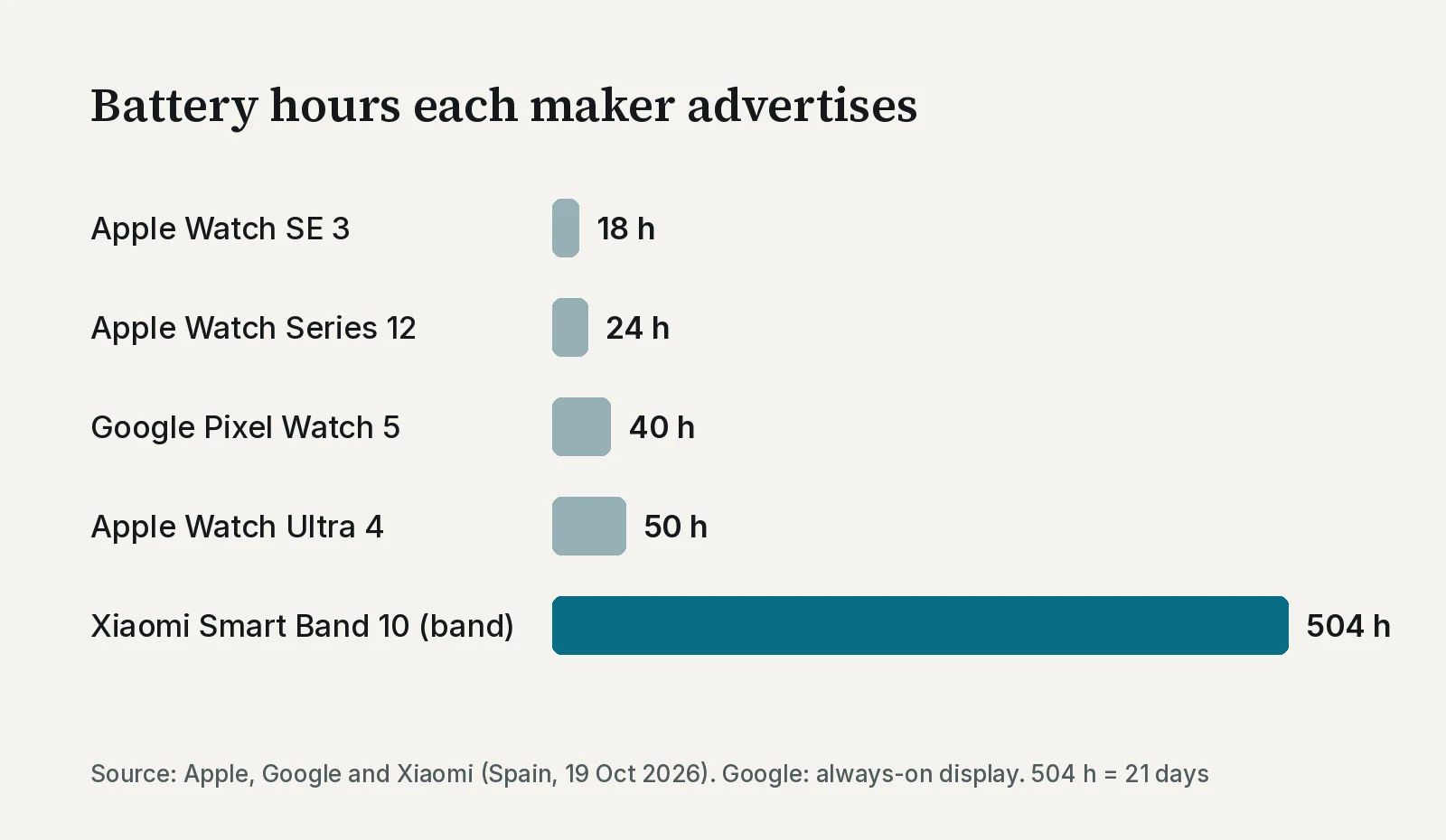
These are the makers’ figures, measured their own way. Apple and Xiaomi give them for normal use: with the screen always on, GPS (satellite location) or lots of notifications, they last less. Xiaomi, for example, gives 21 days of normal use, but 9 days with the screen always on. Google, on the other hand, gives its 40 hours with the always-on display. Samsung does not give hours on the Galaxy Watch9 page: it only says its battery is 390 mAh, a measure of capacity that cannot be compared directly with the others’ hours.
The practical question is this: do you mind charging it every night, like your phone? If not, the Apple Watch SE 3 or Series 12 are fine. If it puts you off, look at the Pixel Watch 5, the Ultra 4 or a fitness band.
Watch or fitness band?
A fitness band is a simple watch: it counts steps, measures your pulse and sleep, and shows you who is calling or messaging. It does not install apps like a smartwatch, but for many people it is all they will use.
A smartwatch makes sense if you want more: paying from your wrist, replying to messages, using apps or, above all, fall detection. Xiaomi does not advertise fall detection on its Smart Band 10 page.
Fall detection: what it does and what it needs
It is a feature designed for exactly these cases, for example if you are giving a watch to your father or mother. The Apple Watch, the Pixel Watch and the Galaxy Watch have it, according to Apple, Google and Samsung (all in Spanish). Apple explains clearly how it works in its help page (in Spanish):
- If the watch detects a hard fall and the person stays still for a minute, a 30-second countdown starts with taps on the wrist and an alert sound. When it ends, it calls emergency services and notifies the emergency contacts with the location.
- If you say you are over 55 when you set up the watch, fall detection turns on by itself. If not, you turn it on in the Watch app on the iPhone, under Emergency SOS. It is only available to people over 18.
- To call, it needs a connection: mobile data on the watch itself, Wi-Fi calling or the iPhone nearby. Apple also warns that the watch “cannot detect all falls”.
That last point decides which version to buy. The SE 3, Series 12, Pixel Watch and Galaxy Watch come in a cheaper version without mobile data: away from home, without the phone nearby and without Wi-Fi, it cannot call. The version with mobile data (Apple calls it “GPS + Cellular”; Google and Samsung, “LTE”) can, but your mobile operator has to support it. The Ultra 4 is always sold with mobile data. In Google’s case, its help page (in Spanish) says that, to get full voice, messaging and data features, the watch and the phone must use the same operator’s network. Ask your operator before you buy it.
The models side by side
| Model | Works with | Battery | Fall detection | Electrocardiogram |
|---|---|---|---|---|
| Apple Watch SE 3 | iPhone 11 or later | Up to 18 h (normal use) | Yes | No |
| Apple Watch Series 12 | iPhone 11 or later | Up to 24 h (normal use) | Yes | Yes |
| Apple Watch Ultra 4 | iPhone 11 or later | Up to 50 h (normal use) | Yes | Yes |
| Google Pixel Watch 5 | Android 12 or later | Up to 40 h (always-on display) | Yes | Yes |
| Samsung Galaxy Watch9 | Android (Samsung gives no minimum version) | Samsung does not say | Yes | Yes, only with a Galaxy phone |
| Xiaomi Smart Band 10 | Android 8 and iOS 14 or later | Up to 21 days (normal use) | Not advertised | No |
An electrocardiogram (ECG) records the heart’s electrical activity and is used to detect irregular rhythms. Apple states on the SE 3 page “ECG app not available”, and that the ECG app is available from Series 4 onwards “except on Apple Watch SE”. Google advertises on the Pixel Watch 5 page (in Spanish) that it “detects possible signs of atrial fibrillation with the ECG app”. Samsung includes it in Samsung Health Monitor (in Spanish), which only works with a Samsung Galaxy phone. None of these readings replaces a doctor: Samsung says so explicitly.
What to choose in your case
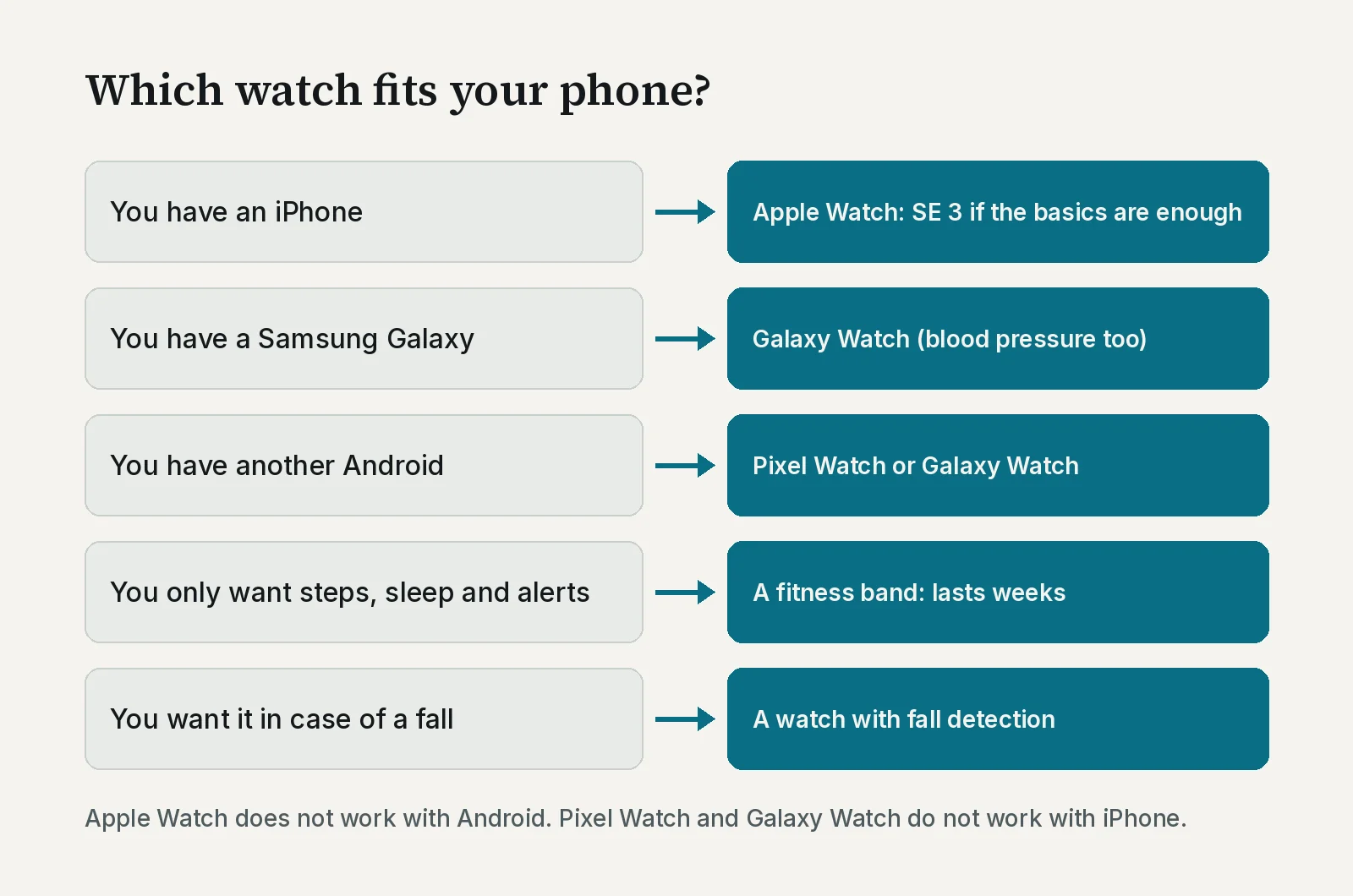
With an iPhone, the Apple Watch SE 3 covers the basics: notifications, steps, sleep, fall detection and Emergency SOS. The Series 12 adds the electrocardiogram and a bit more battery. On Amazon, check that the name says “Apple Watch SE 3” and that it is new: the search also shows refurbished units and watches from other brands that do not work the same way with an iPhone.
With a Samsung Galaxy, the Galaxy Watch9 is the one that works best with your phone. With another Android phone, Google’s Pixel Watch 5, which advertises up to 40 hours of battery.
If it is a gift for your father or mother, think first about which phone they have and whether they go out without it. If they go out without the phone, the version with mobile data is the one that can call for help on its own.
Check any watch in a minute
Copy the full spec sheet of the watch or band you are looking at, paste it into ChatGPT, Gemini or whichever AI you use, and add this:
Here is the spec sheet of a smartwatch or fitness band I want to buy. My phone is [write the brand and model of your phone here]. Tell me in plain language: 1) The exact brand, model and year. 2) Whether it works with my phone and which system version it needs. 3) How many hours or days of battery the maker advertises and under what conditions. 4) Whether it has fall detection and whether it can call emergency services without the phone nearby (mobile data version or Bluetooth only). 5) Which health features it has and whether any only work with phones from a specific brand. 6) What information is missing from the sheet that I should ask the seller about. Do not recommend another model: review only this one. If you are not sure about something, tell me.
The recommendation
Start with your phone, not with the watch. With an iPhone, the Apple Watch SE 3 covers the basics. With a Samsung, the Galaxy Watch9. With another Android phone, the Pixel Watch 5. If you only want steps, sleep and alerts, a band like the Xiaomi Smart Band 10 is enough and lasts weeks without charging. And if the watch is for safety, choose one with fall detection and think about whether you need the version with mobile data.
As an Amazon Associate I earn from qualifying purchases.
Sources
All checked on 19 October 2026.
- Apple Watch Series 12, Apple Watch SE 3 and Apple Watch Ultra 4, Apple Spain (in Spanish)
- Use Fall Detection with Apple Watch, Apple Support (in Spanish)
- Pixel Watch compatibility requirements and availability by territory, Google Help (in Spanish)
- Google Pixel Watch 5 and its specs, Google Store Spain (in Spanish)
- Galaxy Watch9, Samsung Spain (in Spanish)
- Samsung Health Monitor, Samsung Spain (in Spanish)
- Samsung Galaxy smart watch and phone compatibility, Samsung
- Safety features of the Galaxy Watch9 and Galaxy Watch Ultra2, Samsung Newsroom Colombia (19 Aug 2026) (in Spanish)
- Xiaomi Smart Band 10 and its specs, Xiaomi Spain (in Spanish)
Related
- Phones that last: what each brand promises
- Which tablet to buy, and when an iPad is worth it
- How to choose accessories that are actually worth it
Review
Article produced automatically. Date: 2026-10-19. Last checked: 2026-10-19.
Where to see it
- Compare Apple Watch modelsapple.com
- Which phones the Pixel Watch works withsupport.google.com
- Xiaomi Smart Band 10 spec sheetmi.com
Links to the makers’ own pages, in Spanish. They are not affiliate links and earn no commission.
Where to buy it
Paid links. They open an Amazon search using this guide’s criteria. If you buy something after following one, Ibrahin earns a commission and you pay the same price.
- Apple Watch SE 3, for iPhoneamazon.es · paid link
- Samsung Galaxy Watch9, for Samsung phonesamazon.es · paid link
- Google Pixel Watch 5, for Androidamazon.es · paid link
- Xiaomi Smart Band 10, the fitness bandamazon.es · paid link
As an Amazon Associate I earn from qualifying purchases. No specific model is linked because none has been tested here: the search applies the criteria and the decision is yours. The searches may show older, refurbished or other brands’ models: check the exact name before you buy.
How this recommendation was made
Data taken from the official and help pages of Apple, Google, Samsung and Xiaomi on 19 October 2026.
Amazon searches reviewed on 19 October 2026. Prices change without notice: check them before you buy.
This guide has paid links to Amazon, marked as such. If you buy after following them, Ibrahin earns a commission and you pay the same price. No recommendation in this text depends on that commission.